Charter Hosting
  • 0 Shopping Cart
  • Domains
    • Domain Name Suggestion Tool
    • Domain Registration
    • Domain Transfer
    • Domain Renewals
  • Websites
    • Website Builder
  • Hosting
    • WordPress Hosting
    • Cloud Hosting
    • Linux Web Hosting
    • Windows Web Hosting
    • Linux Reseller Hosting
  • Servers
    • Virtual Private Servers
    • Linux Dedicated Servers
  • Email
    • Google Workspace
    • Business Email Hosting
    • Enterprise Email Hosting
  • Security
    • SiteLock
    • SSL Certificates
  • More
  • My Account
    • Get Support
    • Login
  1. Portal Home
  2. Knowledgebase
  3. WordPress
  4. How to remove your post in WordPress?

  Categories

Backup/Restore
4
Cloudflare (cPanel)
9
CloudLinux (cPanel)
10
Combo Plans
1
cPanel - Control Panel
24
Databases
11
Dedicated Servers
13
DirectAdmin
48
DNS
1
DNS - Nameservers
6
Domain Management
10
Domain Names
3
Email
2
Email
17
FTP
9
Hosting
6
Installing a Control Panel
6
Mail Filters & SPAM
8
Mobile
11
More
1
Others
3
PayPal
7
Plesk
47
Reseller Hosting
0
Security
2
Security
10
SiteWorx (Control Panel)
61
Softaculous
76
SolusVM
19
SSL
5
Virtual Private Servers
15
Virtualizor
19
Website Builder
0
WHM
18
WordPress
17

  Categories

  Tag Cloud

CentOS Command Line Debian 10 Debian 9 Debian Buster Debian Stretch Dedicated Server IP Address ISPConfig 3.1 Linux Nginx Plesk Provision Ubuntu 18.04 Ubuntu Bionic Beaver Windows

  Support

My Support Tickets
Announcements
Knowledgebase
Downloads
Network Status
Open Ticket

How to remove your post in WordPress? Print

  • 0

You can remove your published or draft post in WordPress.


1. Login to your WordPress admin dashboard.


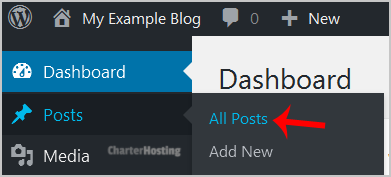
2. Under the dashboard menu, hover your mouse on Posts and then click on All Posts.
wp-first-time-all-post.gif


3. Choose the post you wish to remove, and the Trash option will appear, Click on it.
wp-removing-selected-post.gif

You will get a success message as 1 post moved to the Trash.


Was this answer helpful?

Related Articles

How to access the WordPress admin account? WordPress is a CMS software with an easy to access admin account and a simple to manage blog... How to Install a Plugin in WordPress? You can install a plugin in WordPress in several ways. The best way to install a plugin is to use... How to Manually Install a Plugin in WordPress? The automatic installation of a plugin is easy, and you can also install on manually. It will... How to Deactivate and Delete a Plugin in WordPress? If your plugin is not in use or you wish to deactivate it, you can do this from the WordPress... How to Forcefully Update a Plugin in WordPress? If your WordPress plugin is not working correctly or you want to re-install it even when it is...
« Back

Powered by WHMCompleteSolution

  Tag Cloud

CentOS Command Line Debian 10 Debian 9 Debian Buster Debian Stretch Dedicated Server IP Address ISPConfig 3.1 Linux Nginx Plesk Provision Ubuntu 18.04 Ubuntu Bionic Beaver Windows

  Support

My Support Tickets
Announcements
Knowledgebase
Downloads
Network Status
Open Ticket
  • Contact Us
  • Terms of Service

Copyright © 2026 Charter Hosting. All Rights Reserved.


Loading...
Loading...
Choose language
العربية
Azerbaijani
Català
中文
Hrvatski
Čeština
Dansk
Nederlands
English
Estonian
Persian
Français
Deutsch
עברית
Magyar
Italiano
Macedonian
Norwegian
Português
Português
Română
Русский
Español
Svenska
Türkçe
Українська

Choose Currency

$ USD
$ AUD
$ CAD
€ EUR

Generate Password

Please enter a number between 8 and 64 for the password length